Palworld ESP
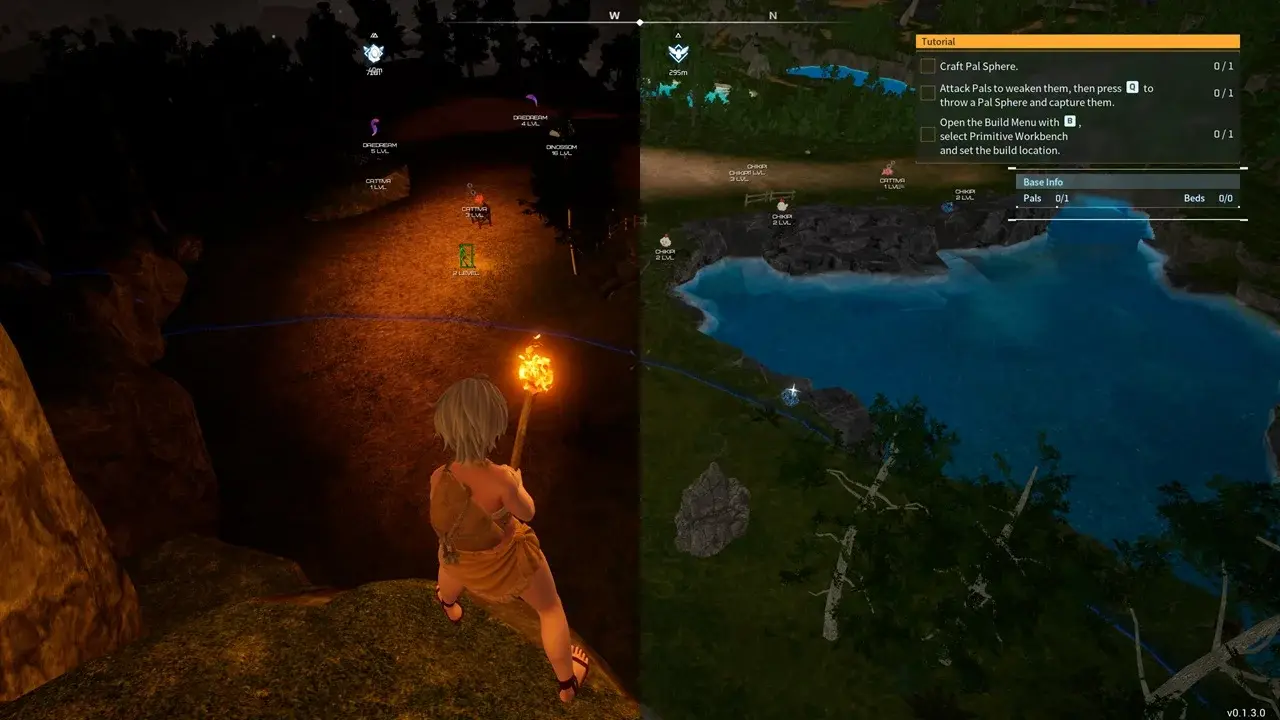
Palworld ESP for PC: player boxes, pal and NPC overlays, skeleton, health bars, plus item ESP for eggs, ore, chests, and battle-mode filters.
Palworld ESP is the vision stack. It draws players, pals, NPCs, and world objects through terrain so you can choose a fight, a catch, or a farm route without guessing behind a ridge. It does not move the mouse. That is Palworld aimbot.
Palpagos is dense. Community maps pin well over a thousand Pal eggs, thousands of mining rocks, thousands of chests, hundreds of fishing spots, and more than a hundred Great Eagle fast-travel statues. An overlay that paints every layer at once is unreadable. Filters are the product.
This guide covers player ESP, pal ESP, NPC ESP, item ESP, and Battle Mode hide controls in one article. People searching Palworld hacks for wallhacks usually want those categories, not five separate posts.
Player ESP vs pal, NPC, and item draws
Player ESP is combat vision: boxes, skeleton, health, name, level, and distance on other trainers. Pal ESP is wildlife and summons: species, level, and whether the pal is wild, owned, or a base defender. NPC ESP is humans who are not you: tamers, merchants, Syndicate, bounty targets.
Item ESP is the world, not a body. Chests, eggs, ore, forage, statues, and fishing spots do not have a skeleton. They get an icon, a name, and a range cap. Mix combat layers with item layers only when the job needs both. Mining does not need player skeletons. PvP does not need berry icons.
Player ESP options
Start here for PvP servers, Arena, and base raids. Keep draw distance inside your weapon range so a trainer across the biome does not paint the whole HUD.
ESP Style
ESP Style is the preset for how player draws look: 2D box, 3D box, corner-only, or a slim outline. Pick one style and stick with it. Mixing styles in a squad clip makes depth hard to read.
Bounding Box and Fill Box
Bounding Box is the rectangle around the player mesh. It shows where a trainer stands behind a cliff, a pal, or a base wall. Use a thin box. Thick boxes hide the skeleton you still need for pose.
Fill Box tints the inside of that rectangle. Low opacity helps you spot a body in fog or night. High opacity hides the game world. Leave fill off in daytime PvP. Turn a light fill on in caves and oil-rig interiors.
Health Bar
Health Bar shows remaining HP on the player. In Palworld PvP you also eat damage from pals and structures, so the bar tells you whether a peek is a finish or a reset. Place it above the box so it does not sit on the name line.
View Line and Line to Enemy
View Line draws where that player is looking. It helps you hold an angle they are not facing. Line to Enemy draws a line from you to them. Use it for rotations, then cap length so the screen is not a spider web of traces.
Skeleton
Skeleton maps bones: head, spine, arms, legs. You see crouch, slide, mount, and whether they are in a grappling jump. Pair skeleton with a box, not instead of a box. Box is position. Skeleton is pose.
Name, Level, Item Name, Distance, Show Icon
Name tags the trainer. Level shows their character level so you do not take a bad 1v1. Item Name can show the held weapon or tool. Distance is world units. Show Icon adds a small marker when the box is too far to read.
Turn Item Name on for PvP so you know if they swapped to a rifle. Turn it off for crowd fights. Distance should match your max useful range. Icons stay useful when you shrink boxes at long range.
Pal ESP options
Pal ESP uses the same visual language—box, skeleton, name, level, distance, icon—but the data is pal-specific. You care about species, element, wild vs owned, Alpha status, and catch level. A Lamball and a tower boss should never share the same color and range.
Filter by job. Catch routes: wild pals only, level on, distance short enough that you can throw a Sphere. Ranch and base defense: owned and base pals, so you see trespass aggro. PvP: enemy summons and mounts, not every berry-bush spawn in the grass.
Alphas and raid pals need a longer draw and a clear icon. Small forage pals need a tight cap or the overlay looks like a particle effect. Skeleton on pals helps with flying mounts, where the hitbox sits above the shadow.
Turn pal ESP down when Battle Mode is for players only. Turn it up when you are breeding-route hunting or clearing a Sealed Realm. Pal ESP is not item ESP. Eggs and ore sit in the item tab.
NPC ESP options
NPC ESP covers Pal Tamers, merchants, Syndicate and faction humans, bounty targets, and camp guards. Tower weak-spot logic still treats the tamer as a shootable human, so NPC draws matter in boss rooms, not only in villages.
Use name + distance for merchants and wandering traders. Use box + health + skeleton for hostile camps and oil-rig guards. Keep vendor NPCs on a separate color from combat NPCs so you do not spray a shopkeeper on a catch run.
Arena Challenge is NPC tamers. Arena PvP is players. If both layers are on, you will misread the lobby. Toggle NPC ESP off in player Arena. Toggle it on for Challenge, towers, and bounty boards.
Items ESP: world objects and loot
Item ESP is a category list. Palworld’s world is pin-heavy: eggs, chests, rocks, forage, fishing, and travel statues all sit in the same landscape. Enable the layer you are farming. Leave the rest off.
Fast Travel and Respawn Point
Fast Travel marks Great Eagle statues and other unlockable travel points. Palpagos has on the order of 130–150 of these, plus extra pins on later maps like the World Tree. The overlay is for finding the next unlock, not for painting statues you already own.
Respawn Point marks dedicated respawn statues, which are far rarer than fast travel. Do not mix the two. A travel statue is a map hop. A respawn statue is where you come back after a wipe.
Treasure Box
Treasure Box covers chests, loot caches, elemental-sealed chests, and similar containers. Palpagos has thousands of chest pins. Cap distance and hide opened boxes or the overlay will never go quiet. Caches refill on a timer, so a short-range chest ESP is a farm route, not a one-time ping.
Rock and Resource
Rock is the mining mesh: stone, ore, coal, sulfur, quartz, paldium, and the rarer late-game nodes. Resource is the broader materials layer when you want named ores without every decorative boulder. Use Rock for generic mining. Use Resource when you are hunting one material. Break speed lives in Palworld exploits Fast Mining, not in this draw tab.
Pal Egg
Pal Egg marks wild egg nests by grade. There are well over a thousand nests on Palpagos alone. Filter by egg tier if the menu allows it. A Grade 1 nest spam will bury the rare nest you actually walked out for.
Foraging
Foraging covers berries, mushrooms, flowers, skill fruit trees, and other gatherables. This layer is huge and low value in PvP. Keep it for base-building and cooking runs. Pair it with pal ESP only if you are also catching the pal that harvests that node.
Dropped Items
Dropped Items are world pickups and loot on the ground after a fight, a supply drop, or a death. Turn this on after PvP or a boss, then off again. Permanent drop ESP makes every junk pile look important.
Statue
Statue is not fast travel. This bucket is for Statues of Power, Lifmunk Effigies, and similar world statues. Palpagos only has a handful of Statues of Power, usually near church travel points. Effigies are the large capture-power collectable set. Keep statue ESP on a unique icon so you never confuse it with a Great Eagle pin.
Fishing Spot
Fishing Spot marks regular and rare fish nodes along coasts and the World Tree waters. Hundreds of spots exist. Rare spots deserve a distinct icon. Normal spots can stay off unless you are on a dedicated fish route.
Gimmick and Other
Gimmick covers interactive world toys: dungeons, sealed realms, supply drops, oil-rig events, warp altars, and similar scripted objects. Other is the catch-all for pins that do not fit a named layer. Check Other after a Palworld patch. New 1.0-era objects often land there first.
Battle Mode hide controls
Battle Mode is a visibility preset, not a new ESP type. It hides layers so a fight stays readable. You keep the combat draws you need and suppress the farm noise.
- Hide Players: Drops player boxes when you are in a PvE farm and other trainers are not the job. Leave this off in PvP.
- Hide Pals: Clears wild pal spam during a player duel or a tamer fight. Turn it back on for catch and raid.
- Hide NPCs: Removes merchants and town humans so camp and tower silhouettes stay clean.
- Hide Items: Kills egg, ore, and forage icons the moment a fight starts. This is the switch most PvP configs should bind.
Bind Battle Mode next to your aim hold key if you run both tabs. Vision gets quiet. The lock in the Palworld aimbot guide then only has to score what you still care about.
ESP category comparison
| Category | What it draws | Key controls | Best use |
|---|---|---|---|
| Player ESP | Trainers | Style, box, fill, health, view line, line to enemy, skeleton, name, level, item name, distance, icon | PvP, Arena PvP, base defense |
| Pal ESP | Wild, summoned, and base pals | Box, skeleton, name, level, distance, icon, wild vs owned filters | Catch routes, raids, enemy mounts |
| NPC ESP | Tamers, merchants, faction humans | Box, health, skeleton, name, distance, combat vs vendor colors | Towers, camps, Challenge Arena, bounties |
| Item ESP | World objects | Fast travel, respawn, treasure, rock, egg, forage, resource, drops, statue, fishing, gimmick, other | Farm and exploration routes |
| Battle Mode | Hide switches | Hide players, pals, NPCs, items | Clean HUD the moment a fight starts |
Readable overlays next to Easy Anti-Cheat
PC Palworld loads Easy Anti-Cheat on official and Steam-protected sessions. ESP is a draw path. It reads entity and world data, then paints an overlay. It does not patch the Palworld binary. After a client or EAC bump, confirm live status, then re-check which item categories still resolve. New regions often add gimmick pins before named filters catch up.
A conservative first preset: player box + health + skeleton, pal name + level at short range, NPC off in towns, items limited to eggs or ore, Battle Mode hide-items bound. Add view lines and fill box only after that HUD stays quiet.
When you want this vision stack in a maintained PC suite, the palworld cheats pages list player, pal, NPC, and item ESP next to the aim tab.
FAQ
Is Palworld ESP the same as aimbot?
No. ESP draws. Aimbot moves the reticle. You can run ESP with aim off for catch and farm routes. Pair them when you already took a fight. See the Palworld aimbot settings for FOV that matches your ESP distance cap.
Should I enable every item ESP category?
No. Palpagos has thousands of chest and rock pins. Turn on the one layer you are farming: eggs, ore, fishing, or travel statues. Use Battle Mode Hide Items as soon as combat starts.
What is the difference between Fast Travel, Respawn Point, and Statue?
Fast Travel is Great Eagle statues and similar map hops. Respawn Point is the smaller set of respawn statues. Statue is collectable or power statues such as Lifmunk Effigies and Statues of Power. They are three different world objects.
Do I need skeleton if I already have a bounding box?
Box shows where the body is. Skeleton shows pose: crouch, mount, and peek. For players, use both at close range. For distant pals, name + icon is enough and keeps the HUD light.
Does Battle Mode change Easy Anti-Cheat?
No. Hide Players, Hide Pals, Hide NPCs, and Hide Items only change what the overlay draws. EAC still loads with the Palworld session. Battle Mode is a readability switch, not a session switch. Re-check status after patches the same way you would for any other module.