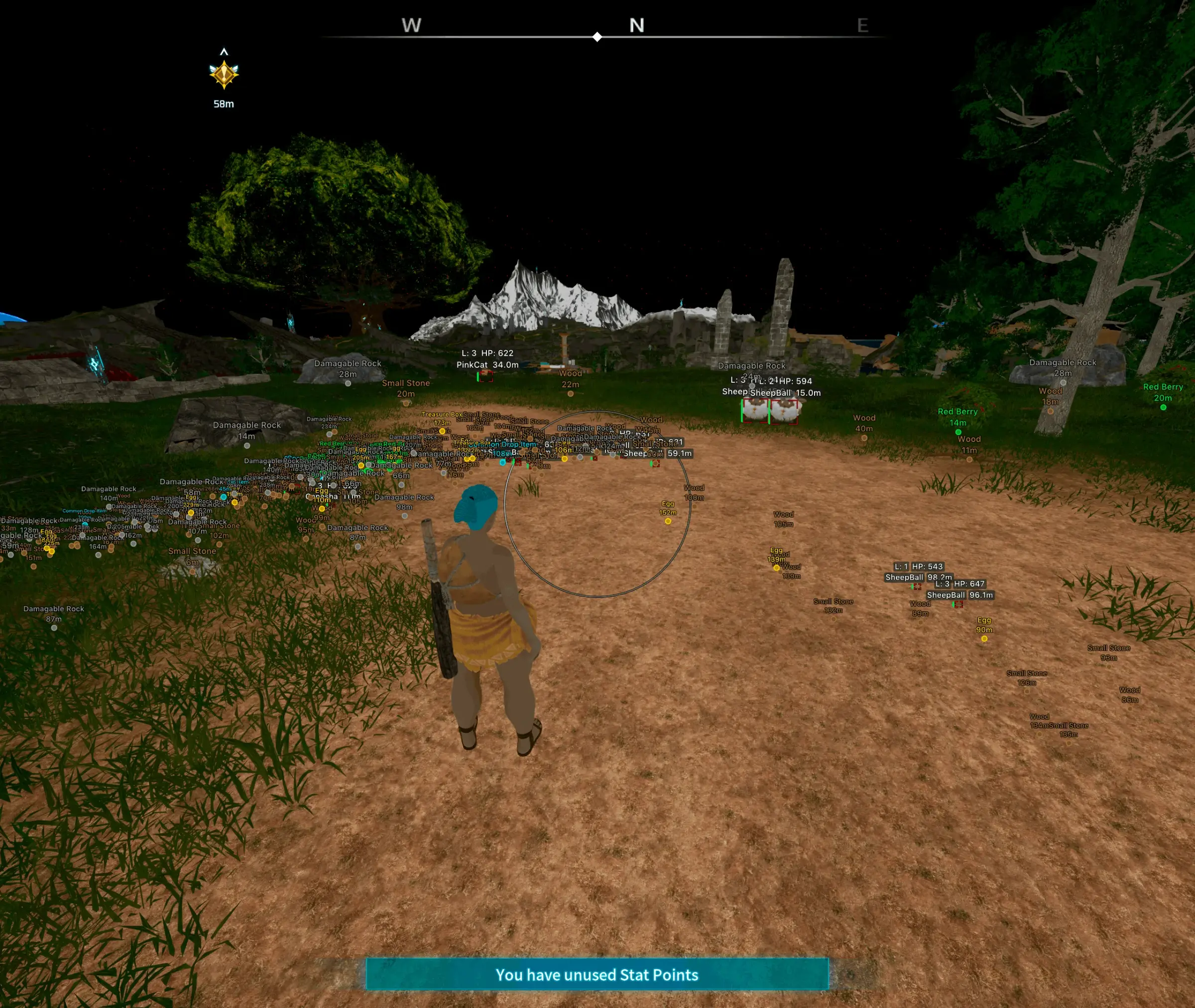
Palworld aimbot
Tune Palworld aimbot for players, pals, and NPCs: bone pick, FOV size, adaptive FOV, smoothness, keybinds, and max distance.
Palworld aimbot is the targeting stack that picks a legal entity, chooses a bone, then eases your reticle toward that bone. It is not a console command and it is not the game’s built-in Pal command wheel. You turn it on, set who it can lock, and cap how far and how fast the pull can travel.
Palworld combat mixes player guns, summoned pals, wild pals, and human NPCs. Headshots on player weapons still add about 50% bonus damage. Tower fights also treat the Pal Tamer as a weak spot. That is why bone pick and target filters matter as much as the lock itself.
This guide covers the full aim menu: enable, target selection, bone selection, keybind, adaptive FOV, FOV draw, FOV size, smoothness, and maximum distance. Players searching Palworld hacks for aim usually want these sliders explained in one place. For boxes, skeletons, and world-item filters without a lock, use the Palworld ESP guide.
How the Palworld aimbot lock is scored
The overlay scores entities inside your FOV circle. It checks category (player, pal, NPC), distance, screen center, and whether the bone is a legal shot. Then it applies smoothness so the mouse path is a curve, not a teleport.
Palworld is an open-world shooter-survival hybrid. Official PC sessions run Easy Anti-Cheat. Aim configs that last after a client patch sit next to that session model. They read entity data and send mouse motion. They do not rewrite Palworld’s binary.
Enable and custom keybind
Enable
Enable is the master switch for the aim tab. Off means no lock, even if FOV is drawn. On means the rest of the sliders can run when your keybind fires.
Keep Enable off in catch runs if you only want ESP later. Turn it on for PvP, Arena, raids, or tower bosses when you want the curve.
Custom keybind
A hold keybind is the usual start. You already chose the fight. The lock only runs while the button is down. Mouse 4 or Mouse 5 keeps WASD and fire free.
Toggle mode stays on until you press again. Use it for long Alpha or raid sprays, not for mixed catch-and-fight routes. Rebind after every config load so the menu key and the aim key never share a slot.
Target selection: players, pals, and NPCs
Target filters decide who is legal before any bone is chosen. Palworld is noisy. A lock that treats every Lamball like a player will yank you off a real fight.
Players
Player targeting is for PvP servers, Arena PvP, base raids, and open-world trespass. When PvP is on, other trainers can shoot you, loot guild chests, and draw base pals into the fight.
Cap player lock to humans you can actually pressure. Skip teammates and guild members. If you also run pal targeting, players should win the score when two entities sit in the same FOV.
Pals
Pal targeting covers wild pals, player-owned summons, and base defenders. Wild pals are the catch and farm layer. Owned pals are the PvP and Arena layer. Base pals aggro trespassers when PvP rules are active.
Pal bodies differ a lot. A flying mount and a ground tank do not share the same head height. Bone pick and max distance should be looser on pals than on players, or the lock will ride empty air above a small pal.
Turn pal targeting off when you are catching and you need the Sphere throw to be yours. Pal command wheel states (Peaceful, Defensive, Aggressive) do not replace this filter. The wheel is in-game AI. The aim tab is overlay math.
NPCs
NPC targeting covers human factions, Pal Tamers, and other non-player characters. Syndicate camps, tower tamers, and Arena Challenge opponents sit in this bucket. Tower weak-spot logic often wants the tamer, not only the boss pal.
Keep NPCs off in dense villages if you only care about PvP. Keep them on for tower, bounty, and faction clears. Mix NPC + pal when a tamer and their pal both have to drop.
Bone selection: head, neck, body, pelvis
Bones are hit locations on the mesh. Palworld ranged weapons reward headshots. That does not mean head-only is always the right lock. Flying pals, cover, and mount height hide the skull for long stretches.
- Head: Highest damage on player guns. Best on standing humans and pals with a clear skull. Worst when the target crouches, rolls, or sits behind terrain.
- Neck: A step down from head. Holds better when the head jitters in and out of the mesh. Good middle setting for mixed player and tamer fights.
- Body: Largest legal area. Use it for shotguns, close pals, and any fight where you need hits more than crits.
- Pelvis: Low aim point. Useful on mounted players and tall pals when the torso rides above your current angle. Also a fallback when head and body clip into cover.
Switch bone by job. Head or neck for rifles on players. Body for chaotic pal swarms. Pelvis when you are shooting up at a flying mount. Do not leave one bone for every playlist.
FOV customization
FOV is the on-screen circle that makes a target legal. Small FOV only helps when you already aimed near them. Large FOV looks like a magnet. Palworld’s camera also has its own field of view. Overlay FOV is a separate circle. Do not confuse the two.
FOV size
Start small. A tight circle matches hip-fire and close pals. Open it a little for long rifle peeks on ridges. If the lock grabs a pal behind the player you wanted, shrink size before you touch smoothness.
Adaptive FOV
Adaptive FOV scales the circle with range or weapon. Close range gets a wider legal area so a rushing pal still counts. Long range shrinks so a distant ore node or random NPC does not steal the lock.
Use adaptive when you swap from shotgun to rifle in one fight. Leave it off if you want a fixed circle you can memorize. Adaptive is a multiplier on FOV size, not a second aimbot.
Draw FOV border and Draw FOV background
Draw FOV Border paints the circle. Use it while you tune size. Turn the border down once the circle matches your muscle memory, or it becomes clutter next to pal health bars.
Draw FOV Background fills the circle with a light tint. It shows exactly which pals and players are inside the legal zone. Keep opacity low. A heavy fill hides eggs, ore, and the game’s own HUD.
Smoothness
Smoothness is how fast the reticle closes the gap to the bone. Low smoothness is a snap. High smoothness is a slow slide that can miss a peek. Palworld pals strafe, hop, and take off. A snap that works on a standing tamer will overshoot a flying mount.
Start slower than you think, on a hold key, with a small FOV. If the curve still looks like a teleport in a clip, raise smoothness or shrink FOV. Change one slider per session.
Pair smoothness with bone. Head + low smoothness is a hard flick. Body + higher smoothness is a tracking curve for pal swarms. Rifle players often want more smooth on the last pixels of the skull so the 50% crit bonus still lands without a robotic jump.
Maximum distance
Max distance is a world-unit cap. The lock ignores entities past it. Palworld draw distances are huge. Without a cap, the overlay can prefer a far Alpha or a ridge camper you cannot pressure.
Set player distance to your weapon’s real range. Set pal distance shorter for catch routes so you do not yank toward a boss across the biome. NPC distance can sit in the middle for camp clears.
After a Palworld patch, re-test distance. New regions and mount speeds change how far a fight actually is, even if the slider number did not change.
Aimbot settings comparison
| Setting | What it does | When to use it |
|---|---|---|
| Enable | Master switch for the aim tab | On for combat sessions; off for pure catch or build work |
| Target: Players | Allows locks on other trainers | PvP servers, Arena PvP, base defense |
| Target: Pals | Allows locks on wild, summoned, and base pals | Hunts, raids, Arena; off for Sphere-only catch |
| Target: NPCs | Allows locks on tamers and faction humans | Towers, camps, Challenge Arena |
| Bone: Head | Aims at the skull / weak spot | Rifles on standing players; clear pal heads |
| Bone: Neck | Aims just below the head | When head jitters or peeks in and out |
| Bone: Body | Aims at the largest mesh | Shotguns, close pals, chaotic swarms |
| Bone: Pelvis | Aims at the lower torso | Mounted targets and tall flying pals |
| Keybind | Hold or toggle that runs the curve | Hold for PvP; toggle for long boss sprays |
| FOV size | Legal circle on screen | Small by default; open slightly for rifles |
| Adaptive FOV | Scales the circle with range or weapon | When you swap close and long weapons in one fight |
| Draw FOV Border | Outlines the circle | Tuning sessions |
| Draw FOV Background | Tints inside the circle | Low opacity while you learn the zone |
| Smoothness | Speed of the mouse curve | Higher for pals and flying mounts; lower only if you need a faster close |
| Max distance | Ignores entities past a world range | Match weapon range; shorter for catch routes |
How aim configs sit next to Easy Anti-Cheat
PC Palworld uses Easy Anti-Cheat on official and Steam-protected sessions. EAC loads with the game process, watches the session, then unloads when you quit. Aim software that still works after a season patch is built around that layout. It keeps the Palworld process boring and sends humanized mouse input from an external path.
Pocketpair has treated cheating as a server-health problem since early access, and 1.0-era clients keep patching the EAC config. After any Palworld or EAC update, wait for live status, then re-test FOV and smoothness in a private world before PvP or official servers.
Conservative first preset: Enable on, hold keybind, players only, body bone, small FOV, adaptive off, border on, high smoothness, short max distance. Add pals and NPCs after that baseline feels stable.
When you want this aim tab in a maintained PC suite, the palworld cheats pages list player, pal, and NPC targeting next to the rest of the overlay.
FAQ
Does Palworld have a built-in aimbot command?
No. The Pal command wheel only sets Peaceful, Defensive, or Aggressive for your pals. It does not move your mouse onto players, pals, or NPCs. Overlay aimbot is a separate targeting stack with FOV, bone, and smoothness.
Should I lock pals and players at the same time?
Only if both are part of the fight. In PvP, prefer players so a stray pal does not steal the curve. In Arena and towers, pals and the tamer both matter, so enable pal and NPC with players as the higher score when a human is in FOV.
Is head always the best bone?
Headshots add about 50% damage on player weapons, so head is the damage pick when the skull is visible. Body and pelvis hit more often on flying mounts, crouch peeks, and small pals. Switch bone by weapon and height, not by habit.
What do Adaptive FOV and FOV size do together?
FOV size is the base circle. Adaptive FOV scales that circle with range or weapon so close pals stay legal and long-range junk drops out. Tune size first with the border drawn, then turn adaptive on if you swap ranges in one fight.
Do I re-tune smoothness after a Palworld patch?
Yes. Client updates can change movement, mounts, and how EAC loads. Check status, load the same config in a private world, and change smoothness or max distance one at a time before you take that profile to official servers.